zaterdag 9 augustus 2014

Chrome style tabs in windows explorer

This plugin is quiet nice. Adds tabs and a horizontal bookmarks bar to your windows explorer.


I tested it out for a week and it is good for a mouse user.
I am a keyboard user and the plugin often responds bad or not at all on shortcuts. probably because the initial focus is not correct or that it works a bit slower. So I went back to the old default explorer.

too bad, hopefully this tool will keep to improve

http://ejie.me/


zaterdag 12 april 2014

color it github

I shift as much of my current development to github. I did some new updates on the 'color it' tool maxscript tool. I am hoping that this way my code will be centralized and that other people can access and improve my code :)

https://github.com/svenfraeys/colorIt-3dsmax

zondag 6 april 2014

3ds max ui designer - Illustrator

When cleaning up file I found something nice from my times when I was developing tools in 3ds max.
So i would like to share it.

It is an illustrator template with 3ds max components. These objects are stretching in a correct way so you can create windows and buttons, scale them without that it stretches in a wrong way.

Download

Enjoy !


zondag 30 maart 2014

Sublime Package : Alignment

A very intersting package for sublime Text is 'Alignment'.
It s very helpful to clean up your code.

https://sublime.wbond.net/packages/Alignment

# before
apple = "appel"
tomate = "tomaat"
orange = "sinaalapple"
pear = "peer"

# after
apple  = "appel"
tomate = "tomaat"
orange = "sinaalapple"
pear   = "peer"

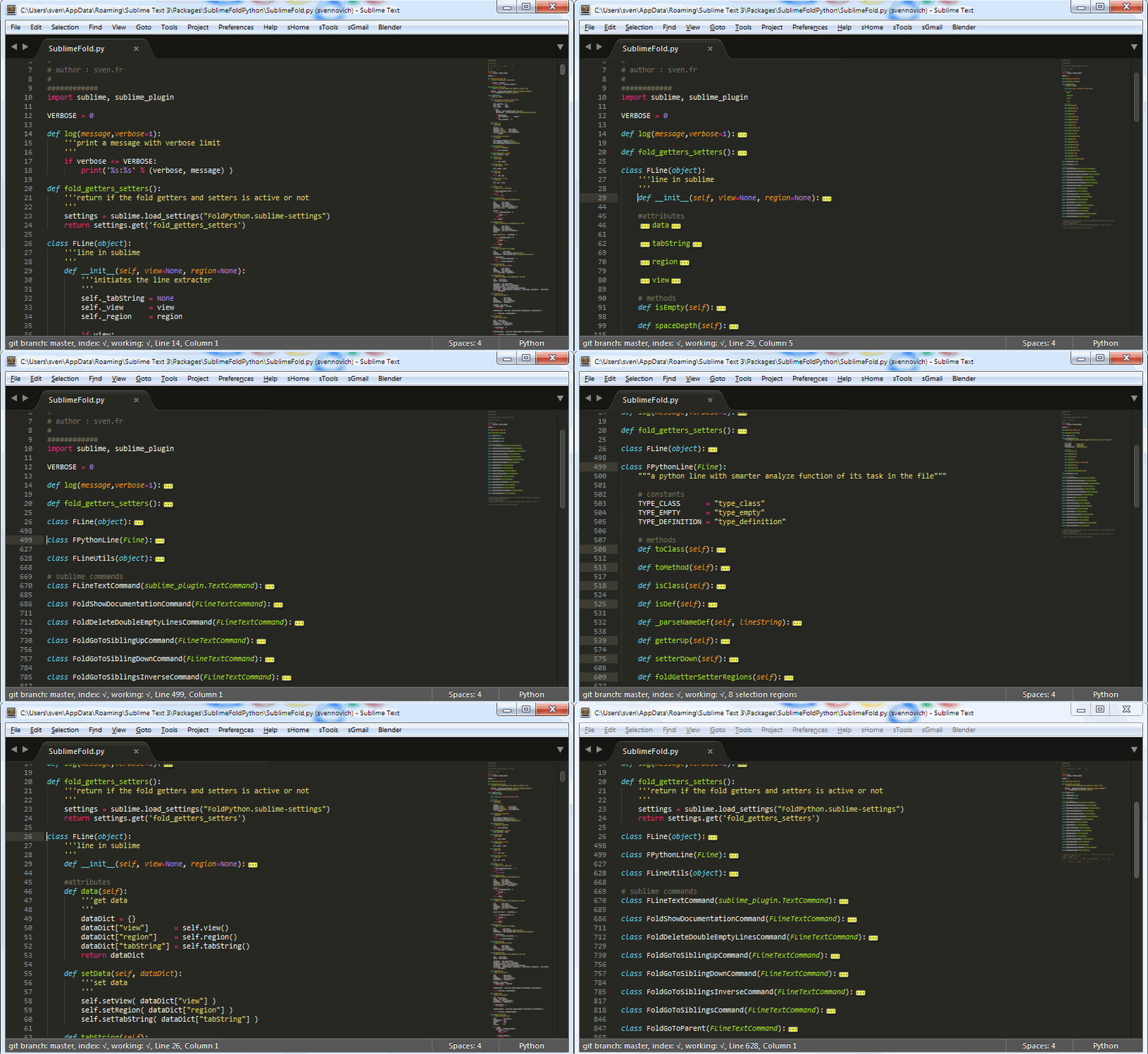
Python Fold - Sublime Text Package

I developed my first package sublime text !

'Fold Python' is a intelligent Folding System for Python.

You can fold, navigate, extend python code in a very fast and easy way.
instant fold all methods, leaving docstrings visible, extending your current code.

I developed it for my own since I am a python developer. And this techniques mainly work thanks to the indent system of Python.

https://sublime.wbond.net/packages/Fold%20Python


zondag 13 oktober 2013

Blender : 'View Selected' shortcut for Laptops

'View to selected' is an important function in Blender (and in any 3d app)
It zooms your current 3D view to the selected items.

'View to selected' by default this is setted as '.' , which is ok.
But when working with a laptop without a numpad it does not work.

For me I changed 'View To Selected' to 'Z' shortcut. (It is also easy to access and easier then the '.' on a numpad.)

In Blender 'Z' toggles between 'Wireframe' and 'Shaded' view. For me this is not an action I need that often (at the moment).


Learning Blender Part 2 : Modeling

First 3D modelling experience in Blender.

I descided to model a cartoon bat face. in a cartoon. It s always best to start with something simple with not too much details.

This excersise was good cause it helped me understand, how to manage multiple objects, how to use modifiers (mirror), and the modeling techniques in Blender.

The model is not finished and loops still have some errors.


When getting in to this exercise (after learning the basics).
These were the tools I used the most in blender.

Modeling Tools
E : Extrude
G + G : move on edge
Alt + R : loop connect
K : knife
O : activate soft selection, pretty cool cause you can easily change the soft range with your mouse scroll !
Alt + M : merge vertex, edges
F : bridge two edges
P : Detach
X : Delete Face, Edge, Dissolve

Settings
Preferences : Rotate Around Selected (a must for modeling)
Prompt Quit : Needed otherwise you just loose your files